Understanding Custom 3D Configurator Technology
As businesses strive to enhance customer engagement and streamline complex purchasing processes, the role of a custom 3D configurator has become increasingly vital. These innovative tools allow customers to visually customize products in real-time, ensuring that they get exactly what they want while providing businesses an efficient way to manage product variability. In this article, we will delve into the essence of custom 3D configurators, their significance in the marketplace, and how they function to meet both user and organizational needs.
What is a Custom 3D Configurator?
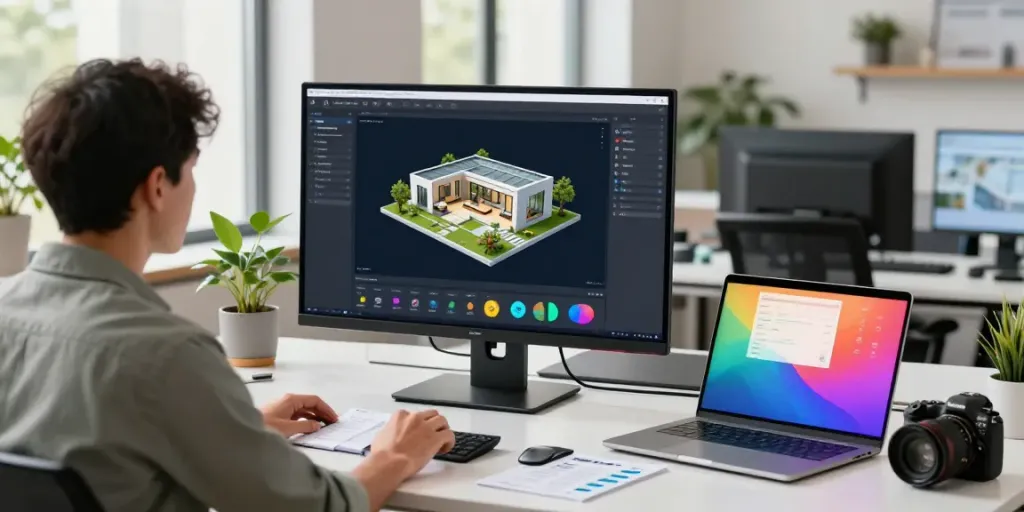
A custom 3D configurator is an interactive software tool that allows users to personalize products according to their specifications. Designed primarily for industries with complex product lines—such as furniture, automotive, and industrial machinery—these configurators present an intuitive interface where users can manipulate 3D models to visualize their choices dynamically. The configurator not only showcases product variations but also integrates features like pricing, material selection, and feature comparisons, making it easier for customers to make informed decisions.
The Importance of Customization in Today's Market
In a world where consumers are increasingly seeking unique products, customization has become a key differentiator. Companies that embrace personalization through tools like custom 3D configurators tend to foster better customer relationships and drive sales. By offering a tailored shopping experience, businesses can cater to individual preferences, ultimately enhancing customer satisfaction and loyalty. As digital transformation accelerates, the ability to provide real-time customization is not merely a competitive advantage—it's becoming a necessity.
How Custom 3D Configurators Work
Custom 3D configurators operate by connecting various data points, including product geometry, materials, and pricing rules, into a cohesive user experience. The process typically unfolds as follows:
- User Input: Customers begin by selecting product types and options from the configurator's interface.
- Visualization: As choices are made, the 3D model updates in real-time, reflecting the selected specifications.
- Rules Management: Behind the scenes, the configurator applies business rules to ensure options are valid—such as dependencies between features or material availability.
- Pricing Calculation: Live pricing updates enable customers to see how their selections impact the total cost.
- Documentation: Once a configuration is finalized, users can generate quotes or proposals that include all selected options and pricing.
Key Features of Effective Custom 3D Configurators
Interactivity and User Engagement
Interactivity is at the heart of custom 3D configurators. Engaging interfaces allow users to rotate, zoom, and visualize their customizations in immersive environments, enhancing the experience. Higher levels of user engagement typically lead to increased conversion rates, as customers are more likely to complete a purchase when they can see their personalized product in detail.
Integration with Existing Systems
For a custom 3D configurator to be truly effective, it must integrate seamlessly with existing enterprise systems, including CRM, ERP, and PIM. This integration allows for consistent data sharing and workflow optimization across departments. For instance, a configurator that links to an ERP system can ensure that inventory levels are accurately reflected in real-time, preventing over-promising on product availability.
Real-Time Pricing and Visualization
Real-time pricing updates are crucial for a positive user experience. Customers can see immediately how their choices affect the price, which helps in making decisions. This functionality, combined with robust visualization capabilities, gives customers a clear understanding of what they are purchasing, fostering trust and transparency in the transaction.
Implementing a Custom 3D Configurator: Best Practices
Preparing Your Product Data for Configuration
The success of a custom 3D configurator largely depends on the quality of the underlying product data. This means accurately structuring and modeling your products in a way that allows for rich customization. Ensure that each product variant is clearly defined, including dimensions, materials, and available options, to facilitate a smooth customer experience.
Mapping Customer Journeys with Configurators
Understanding the customer journey is essential for configuring the software to meet user needs effectively. This involves determining the key touchpoints where users interact with the configurator and ensuring that each step is streamlined. Mapping out these journeys aids in identifying potential roadblocks and opportunities for enhancing user engagement.
QA and Testing for Optimal Performance
Quality assurance (QA) is a critical phase in the implementation of a custom 3D configurator. Testing should encompass usability, performance, and integration scenarios to ensure that everything works as intended. This includes verifying that the real-time updates for pricing and visualization operate without glitches, which is imperative for maintaining customer trust.
Case Studies: Success Stories with Custom 3D Configurators
Manufacturing Success: Customizable Industrial Solutions
One notable case involves a manufacturer specializing in industrial equipment. By implementing a custom 3D configurator, they allowed clients to build complex machinery tailored to their specific needs. This approach did not only enhance client satisfaction but also reduced production delays, as clear specifications were provided right at the time of order.
Retail Innovations: E-commerce Applications
A leading furniture retailer utilized a 3D configurator on their e-commerce platform that let customers customize furniture pieces. This innovation led to a significant increase in user engagement and overall sales by helping customers visualize their choices in real-time, thereby reducing returns and enhancing customer satisfaction.
Project-Based Sales: Enhancing Customer Experience
For project-based sales, a successful construction company integrated a custom 3D configurator into their sales process. The tool enabled clients to configure their projects, from design to pricing, which streamlined approvals and increased conversion rates. By simplifying the configuration process, the company could focus more on relationship-building and less on administration.
The Future of Custom 3D Configurators in 2026
Emerging Trends and Technologies
Looking towards the future, custom 3D configurators are expected to incorporate advanced technologies such as augmented reality (AR) and artificial intelligence (AI). These technologies will enhance customer interactions by allowing users to visualize products in their surroundings and receive personalized recommendations based on their browsing behavior and preferences.
Challenges and Opportunities Ahead
As the landscape for custom 3D configurators evolves, businesses may face challenges such as ensuring data security, managing integration with ever-changing systems, and maintaining user engagement over time. However, these challenges also present opportunities for companies willing to innovate and adapt their offerings to stay competitive.
How to Stay Ahead in the Competitive Market
To retain a competitive edge in the market, organizations must prioritize adaptability and continuous improvement in their custom 3D configurators. This includes regular updates to product data, integrating new technology features, and maintaining a user-centric focus throughout the development process.
What industries benefit from a custom 3D configurator?
Custom 3D configurators have applications across various industries, including:
- Manufacturing: Allowing for complex product builds.
- Retail: Enhancing customer shopping experiences through visualization.
- Construction: Supporting project-based sales with tailored configurations.
- Automotive: Offering customizable vehicle options to buyers.
How can I integrate a custom 3D configurator with my CRM?
Integrating a custom 3D configurator with your CRM involves defining the data flow and establishing connections between both systems. This typically includes setting up API integrations that allow customer data and configuration records to sync seamlessly, enabling your sales team to access essential information at any point in the customer journey.
What are the costs associated with developing a custom 3D configurator?
The costs associated with developing a custom 3D configurator can vary widely based on complexity, features, and integration needs. Organizations should budget for initial development, ongoing maintenance, and potential updates. Engaging with software specialists can provide a clearer understanding of the specific investments required.
Can a custom 3D configurator improve sales conversion rates?
Yes, a custom 3D configurator can significantly improve sales conversion rates by enhancing customer engagement and facilitating informed decision-making. As customers interact with the configurator, they gain a better understanding of the product, which reduces uncertainty and boosts the likelihood of completing a purchase.
What support and training are needed for teams using configurators?
To maximize the benefits of a custom 3D configurator, training and support for team members are essential. This could include user training sessions, resources for troubleshooting, and regular updates on new features. Investments in ongoing support can help teams leverage the configurator effectively and drive better results.